
Patient Portal

If you need to create an account or login to your existing portal account, please click the link below. 

View Your Patient Portal

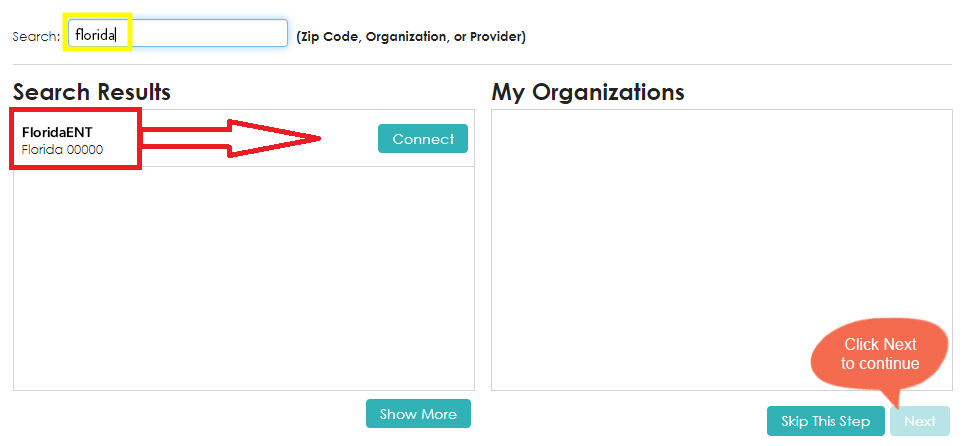
Request Connections to Healthcare Organizations

Requesting a connection informs your healthcare provider that you would like your medical information to be made available online through FollowMyHealth.

If your healthcare provider is a participant in FollowMyHealth they will display in the search results. Use the search box to locate available connections by entering your zip code, provider, or healthcare organization.

Please note that response times to your connection requests may vary by organization or provider.

Requesting Records Online 

As members of the Elevate ENT Partners network, we now offer an online records request tool that verifies your identity by asking for a photo of your driver's license, which can be taken via webcam or smartphone. There is no additional charge to use this service.

Click the button below, select "I'm ready, let's get started", then select your State to get started. 
Please note: Chrome, Safari and Firefox are the recommended browsers for this application 

CLICK HERE TO REQUEST YOUR RECORDS ONLINE


For Medical Professionals

Records request tool

Our paperless request process does not require a login but uses email verification for enhanced security.  No faxing, scanning or printing will save you time.

Note: Please use a recent version of Chrome, Firefox or Safari

RECORDS REQUEST FOR PROVIDERS

With 37 convenient locations across the South Florida area, we’re never far away.

Find your ENT Request Appointment
Contact us media
Accessibility: If you are vision-impaired or have some other impairment covered by the Americans with Disabilities Act or a similar law, and you wish to discuss potential accommodations related to using this website, please contact our Accessibility Manager at (305) 558-3724.